Ask your business anything.
Wemu AI answers from your live sales, bookings, stock and team, and does the work when you tap Confirm. Type it, or hold the orb and say it.
A free monthly allowance on every plan · 7-day trial includes the Scale tier · No credit card


Ask
Plain questions. Answers from your live numbers.
Ask in Messages, or tag @ai in any team chat. Wemu AI reads what's in Wemu right now: sales and orders, stock and suppliers, costs and margins, customers, bookings and classes, the roster and leave, invoices, quotes and expenses.
On any screen, ask “what can I do here?” and it lists what it can do for you there.

Confirm
Nothing changes until you tap Confirm.
Ask for a change and Wemu AI shows a card first: what will change, for whom, any amount, and whether anyone gets a message. Only the person who asked can confirm it.
- Your role and access are checked again when you tap Confirm
- If a booking, task, order or item changed since, it tells you instead of going ahead
- Two taps can't run the same action twice

Talk
Hold the orb and say it.
Press and hold the orb at the top of Wemu, say what you need, then let go. It answers out loud. For bookings, shifts, tasks, check-ins, leave and sold-out items, you can say “confirm” too.
Anything that moves money, deletes something or sends a customer a message always needs a tap.

Across Wemu
Every sale on the till is in the answer.
Sales rung up on Wemu POS, at the counter or on a handheld, land in the same account Wemu AI reads, along with online orders, bookings and invoices.
Screens are from Wemu, with a demo café's data. Devices shown are illustrations.
Just ask
The questions that used to take an evening.
The things owners dig through screens and spreadsheets for. With Wemu AI you ask in plain words and get the answer from your own numbers.
Before a promo
Not sure who your best customers are.
Who are our biggest customers?
The customers who've spent the most, with how many orders each has placed and their total spend.
Sunday
Not sure the month made money.
What was our profit over the last 30 days?
Revenue minus the expenses you've recorded for those 30 days, and your margin.
Tuesday
Regulars you haven't seen in a while.
Who hasn't been back in 60 days?
The list, with when each person last came in. It can draft a text to each one, for a manager or owner to confirm one by one.
Payday
Working out commission.
What commission do we owe for the last 30 days?
Each person's commission over those 30 days, the same figure as the Commission card in Reports for the same dates. Only the owner and admins see everyone's, in their own chat.
7:30 AM
Who's actually in today?
Who's working today?
The roster next to the clock: who's in, on a break, running late, or on leave.
Before an order
Working out what to reorder.
What do we need to reorder?
What's running low, grouped by supplier. It can draft the purchase order for you to check before anything is sent.
Real screens
Same assistant, every kind of business.
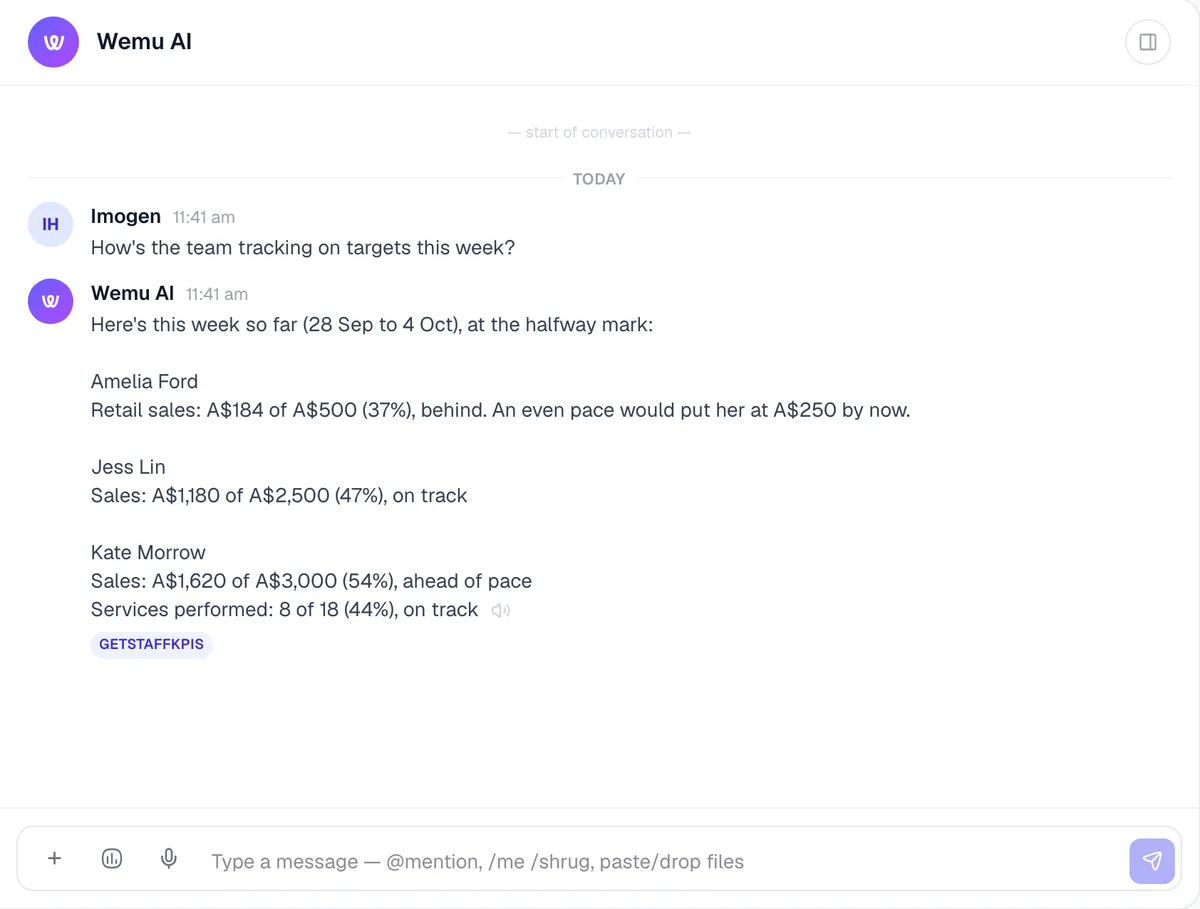
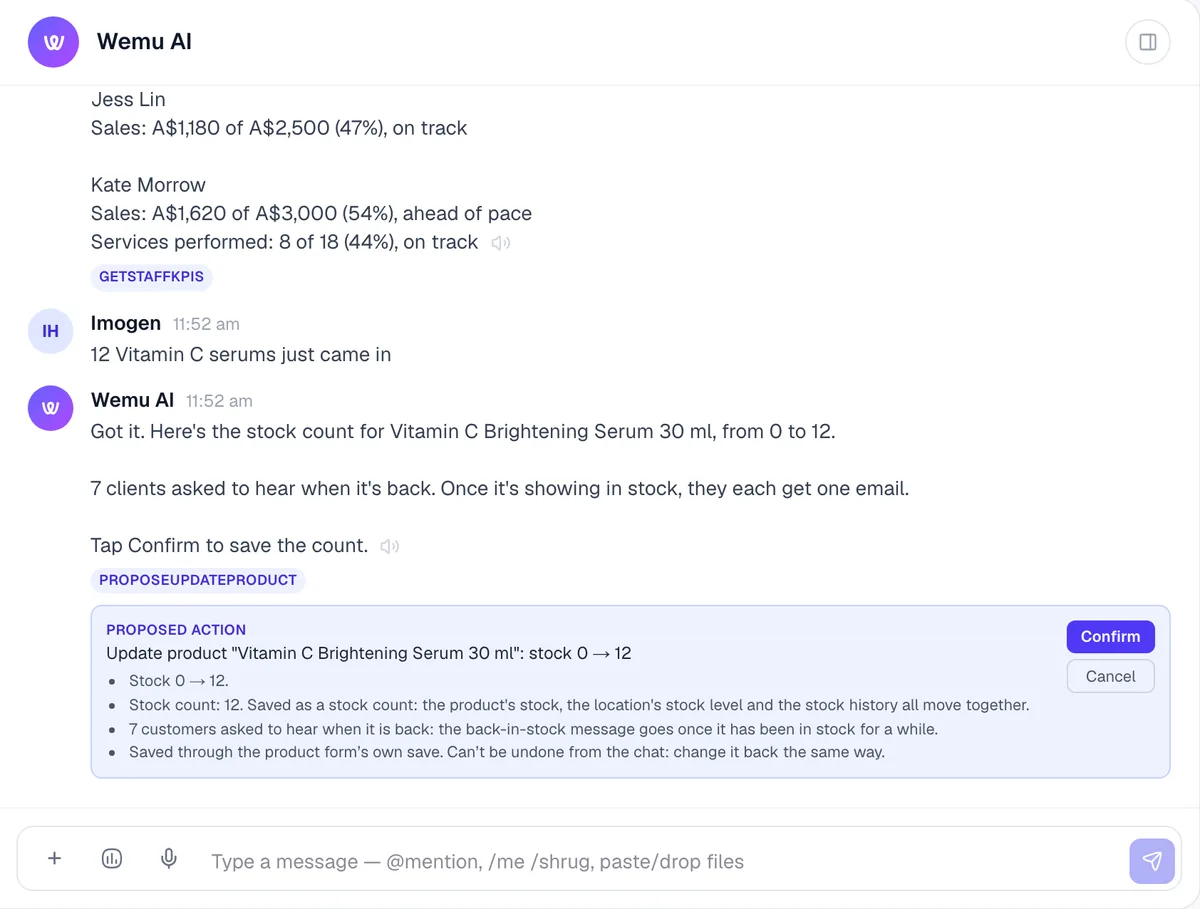
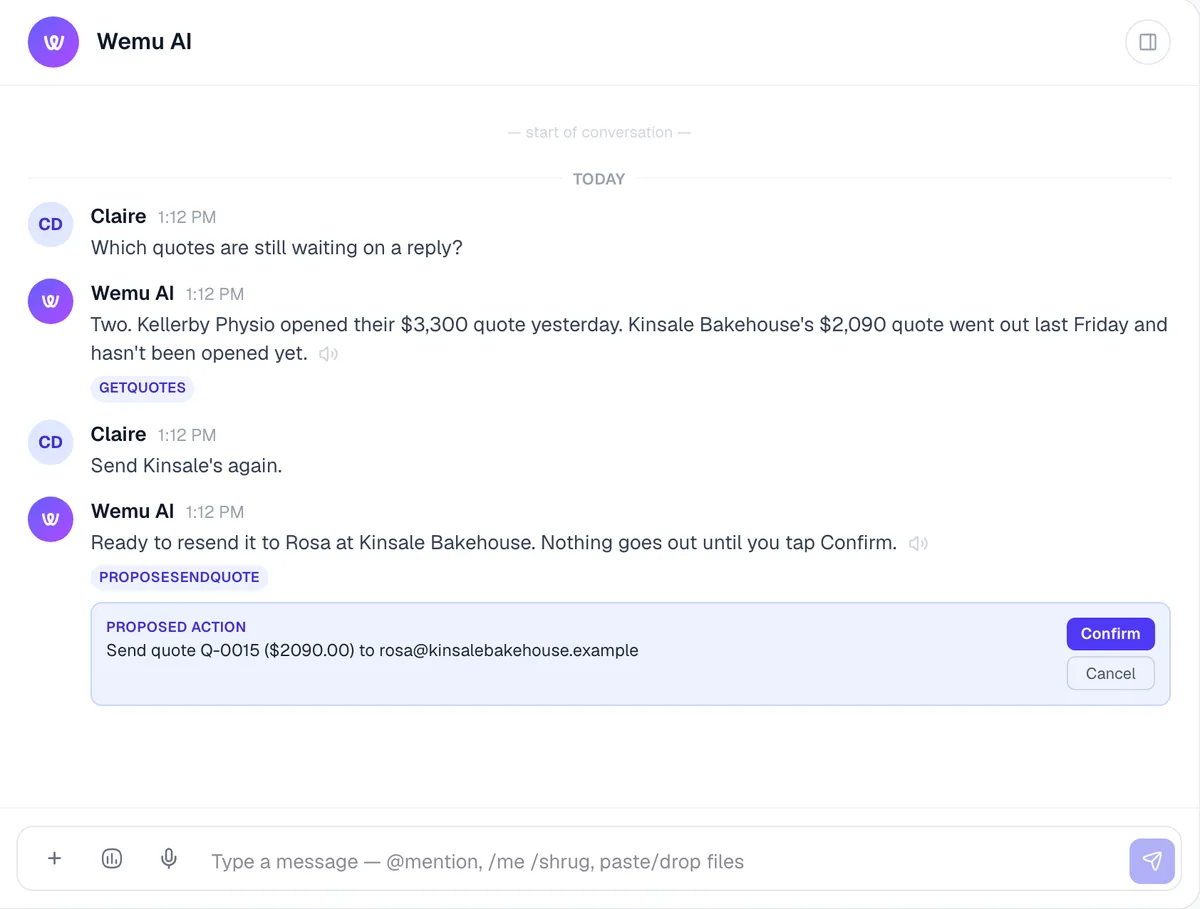
Wemu AI in the Wemu web app, with demo businesses’ data. Select a screen to see it full size.
Who can do what
It follows your team’s roles.
Roles are checked when someone taps Confirm, not just when they ask. Where a screen needs a permission, so does Wemu AI.
Anyone you give Wemu AI to
- Ask about sales, customers, stock and bookings
- Create tasks and make bookings
- Mark items sold out
- Draft a purchase order
Owners, admins and managers
- Anything that moves money: refunds, marking orders and invoices paid, deposits
- Texting a customer and sending campaigns
- Cancelling bookings, approving leave
- Deleting tasks, products and expenses
Only the account owner
- Deleting a customer (or someone you've given Delete customers), never by voice
- Adding, editing or deactivating team members
- Changing the currency, timezone or country, or adding a location
- Setting a budget, and undoing an import
Pay stays private. Payroll, pay rates and the whole team’s commission are shown only to the owner and admins, in their own Wemu AI chat.
It never charges a customer’s saved card. Money actions are taps, by someone allowed to make them.
Not yet: shipping orders, emailing invoices, receiving stock and approving timesheets. Those are done on screen for now.
Every weekday
Yesterday, in one short note.
On weekdays Wemu AI posts a summary in one Wemu AI channel for the business: the previous day’s orders and sales (a UTC day, for now) with the top three sellers, how many customers haven’t been back in 30 days, how many products are running low, and what’s owed on unpaid invoices. Days with nothing to report are skipped.
Apart from a hello when its chat is first set up, it’s the only thing Wemu AI posts without being asked. Everything else waits for you.
Wemu AI Weekday digest
☀️ Daily snapshot for 2026-10-02
📈 168 orders · $1962.40
Top sellers: Flat White ($266) · Oat Latte ($190) · Butter Croissant ($132)
👋 14 lapsed customers haven’t been in for 30+ days. Want me to draft a win-back SMS?
⚠️ 3 products below reorder threshold.
💸 $640.00 in outstanding invoices.
Ask me anything about this — I can dig deeper on any of these.
See it in a real day
A day with Wemu AI

Plans
Free to try. Pay only for heavier use.
Every Wemu account gets a small free Wemu AI allowance each month. For more, the add-on comes in three tiers. It’s the same assistant on each; they differ only in how much you can use it.
Every plan
Free
A small allowance each month, to try it on your own business.
Wemu AI Lite
US$9 / month
A$13 in Australia · ₱565 in the Philippines
Wemu AI Pro
US$19 / month
A$27 in Australia · ₱1,192 in the Philippines
Wemu AI Scale
US$49 / month
A$70 in Australia · ₱3,075 in the Philippines
- Talking uses the same allowance as typing.
- The allowance resets on the 1st of each month.
- The 7-day trial includes the Scale tier.
Questions about Wemu AI
Does Wemu AI do things without asking?
No. It answers questions straight away, but anything that would change your data comes back as a Confirm card first, and nothing changes until you tap Confirm. The only things it posts by itself are a short summary on weekdays and a hello when its chat is first set up.
Who can confirm what?
Anyone you give Wemu AI to can ask about sales, customers, stock and bookings, and confirm everyday actions like tasks, bookings and sold-out items. Anything that moves money needs an owner, admin or manager. Deleting a customer is for the account owner, or someone they've given Delete customers. Changing team members, and the business's currency, timezone or country, are for the account owner. Roles are checked again at the moment someone confirms.
Can I talk to it?
Yes. Press and hold the orb at the top of Wemu, say what you need, then let go, and it answers out loud. You can say “confirm” for the latest card within 10 minutes for bookings, shifts, tasks, check-ins, no-shows, leave, staff targets, logged calls and sold-out items. Anything that moves money, deletes something or sends a customer a message always needs a tap.
How much does it cost?
Every Wemu account gets a small free allowance each month. For more, the Wemu AI add-on is US$9 (Lite), US$19 (Pro) or US$49 (Scale) a month; in Australia A$13, A$27 or A$70, and in the Philippines ₱565, ₱1,192 or ₱3,075. The 7-day trial includes Scale, and the allowance resets on the 1st of each month.
Can my staff see everyone's pay?
No. Payroll, pay rates and the whole team's commission are shown only to the account owner and admins, and only in their own Wemu AI chat. Everyone else sees only their own commission. When someone tags @ai in a shared team chat, the answer leaves out pay.
What can't it do yet?
It can't yet ship orders, send invoice emails, receive stock or approve timesheets. Those are done on screen for now.
The full list of what it can do, by area, is in the help center: What Wemu AI can do.
Ask your first question today.
Start a 7-day free trial. Wemu AI comes with the Scale tier while you try it, so you can put it to work on your real numbers. No credit card.